MediaWiki Image Link Workaround

So, in playing around with my user page and trying to make it look pretty, I found out that you can link an image to an internal or external link like you might normally do instead of the File: page. That’s great, but the problem I found was that except for the basic internal and external link, when you linked the image to something that inherently has a little icon next to it (e.g. mailto link gives you a little e-mail icon), then it would show the icon next to the image (see below left).

So, it turns out that there is a workaround to hide the icon (see above right). You can add this bit of code to the main.css file:

#bodyContent .plainlinks a {
background: none repeat scroll 0 0 transparent !important;
padding: 0 !important;
}

Or if the CSS Extension is installed, you can hack it by using the same code, but you’ll probably want it to be context dependent if you can.

Library and Archives Canada (LAC) Preservation Centre

So our group actually went on this tour back on May 18th, but I somewhat forgot to write about it.

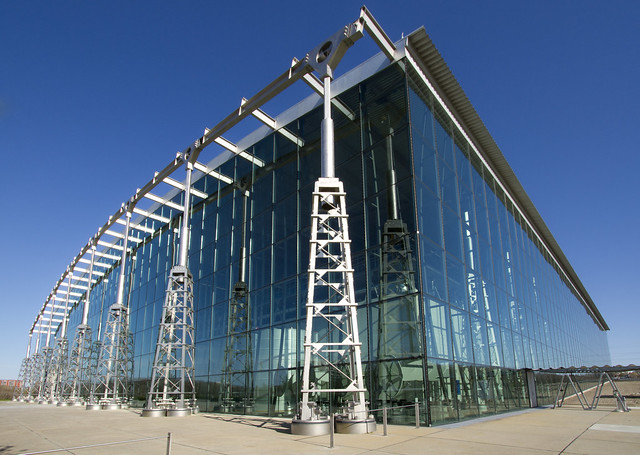
I apologize for lack of pictures. We weren’t really allowed to take anything in with us, so the best I can do is describe it. Click on the image below though, they have a few pictures on their own site.

Library and Archives Canada Preservation Centre

The architecture is really interesting since it’s inspired by the Prairies. The towers look like oil rigs, and the various connected buildings in and outside look like barns or silos. The Centre itself is also separated into two sections. The inside vault is basically in a big cement block and then there’s a large hallway space with a glass building surrounding it. To give you perspective on the size, it’s two football fields big and could fit 2 boeing 747s if the vault wasn’t in it.

The inside has 4 floors of vault and then an open floor above for work areas. Each vault floor has numerous vaults separated into rectangular rooms much like most places that store materials. Humidity and temperature is different depending on the format of the material inside as to be expected. Audio/video is of course as challenge due to the shifts in format/technology. The paintings are pretty neat. There were a number of Laurier portraits, the Churchill one was nice, and copies of the original Proclamation of the Constitution Act. The original we’ve been told is in a top secret vault (no kidding).

Proclamation of the Constitution Act

The top floor is the “village” where they have little huts with all the equipment they need to do restoration, preservation, and format transfers. They’re considered huts since they can be reconfigured (I imagine they don’t do it all that often though). Particularly neat was the page remaking process where they remake and fill in what’s missing of each page from a book, and also the cover remaking/rebinding. We got to watch a short video on the comparison between before and after a film restoration which was pretty cool.

It was a very cool tour. It’s definitely worth going if you have time!

Adjusting Management Styles and Organizational Cultures

I’m sure everyone has experienced it when they change jobs. Everyone has experienced the shift and the need to adjust to a new job, manager/supervisor, and organization. I think what’s really hit me is that I’ve gone from one end to the pendulum to the complete opposite (or so it seems).

Management

At my old job, I was basically given a one liner on what I should be doing, “go do x, and if you don’t know how, just read up on it and give it a go.” If I needed help though, my coworkers would be more than happy to. I used my time as I saw fit in working on projects, and attended workshops on campus.

Now, I get lots of detail on what is being asked of me. I also send everything to be vetted by my manager and sometimes other coworkers. I keep a list of everything I’m working on and completed as well. I ask permission to go to anything my manager hasn’t directly sent me to.

Organization

In general, yes, things were divided by units or departments, but we got good response time for the most part and had a fair amount of control over what we could do. It was fairly easy to contact people and find out what information you wanted or needed.
Now, things are not only divided, things sometimes frustrate me, because we get minimal to little support in some areas. I also find it difficult to get information, having to through unusual ways to get it frequently. Though I admit, I think a lot of it is having no control and being allowed to be given any. It’s irking especially to know that you could probably fix it yourself, but it’s not your job. Then again, it seems I’ve just been “lucky” to encounter a number of issues and it’s not that common for a lot of the little things to happen that have been bothering me. Don’t get me wrong, a lot of things do go very well. I have found people very helpful and willing to help, and IT help desk is great!

Conclusion

There is no better, just different and what fits better with your work style.


general, yes, things were divided by units or departments, but we got good response time for the most part and had a fair amount of control over what we could do. It was fairly easy to contact people and find out what information you wanted or needed.

What do you call a wiki moderator?

Just a quick post.

At my old work, wiki moderators = wiki gardeners.

At my new work, wiki moderators = wiki gnomes.

Interesting that they all refer to gardening in some way, but I suppose that’s just a general wiki trend. I think I like the gardener title better, but gnomes definitely allows for some interesting pictures.